
Connect Discord
Anello posts bot alerts to Discord through an incoming webhook: a URL you create inside your own server that lets Anello send messages to one channel. There’s nothing to install. No Discord app, no OAuth, no bot to authorize. You make the webhook, paste its URL into Anello, and you’re connected.
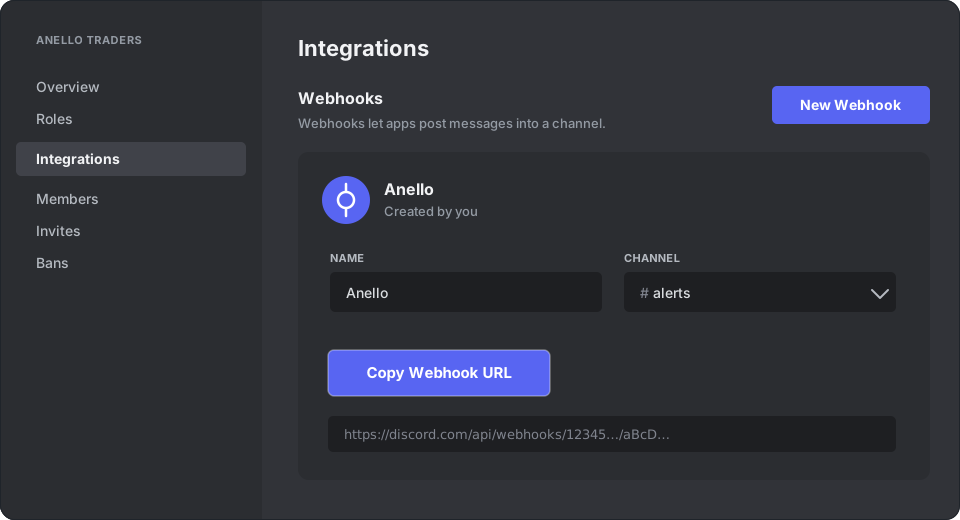
The whole setup takes about a minute and lives entirely in Discord’s Server Settings → Integrations screen:
Before you start
Section titled “Before you start”- You need a server where you can Manage Webhooks: you own it, or have a role with that permission.
- Pick the channel you want alerts to land in. A webhook posts to exactly one channel.
Create the webhook in Discord
Section titled “Create the webhook in Discord”-
Open your server, click the server name at the top-left, and choose Server Settings.
-
In the sidebar, open Integrations, then click Webhooks → New Webhook. (The button reads Create Webhook if the server has none yet.)
-
Click the new webhook to expand it. Optionally rename it (e.g. “Anello”) and set Channel to where alerts should post.
-
Click Copy Webhook URL. It looks like this:
https://discord.com/api/webhooks/123456789012345678/aBcD…
Paste it into Anello
Section titled “Paste it into Anello”-
In Anello, open Notifications and choose Connect Discord.
-
Paste the webhook URL and save.
-
Anello immediately posts a test message to the channel:
✅ Anello connected to this channel.
See it? You’re done. If Anello rejects the link, the URL isn’t a valid Discord webhook (re-copy it from step 4) or Discord refused the request. Try again.
The flow at a glance
Section titled “The flow at a glance”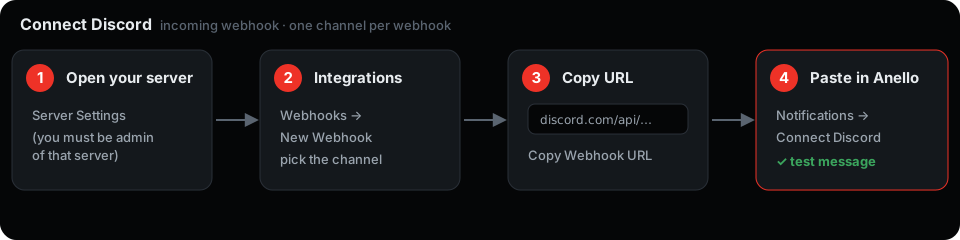
How it works
Section titled “How it works”When a bot event fires, Anello sends an HTTP POST to your webhook URL and Discord renders the message in that channel. The webhook is write-only to a single channel. It can’t read messages or see anything else in your server.
Every event goes to Discord by default. Toggle them per channel under Notifications → routing:
- Bot started / Bot stopped
- Order placed
- Order filled / Order partially filled
- Order canceled by you on the exchange
- Grid needs attention / Grid recovered
- DCA purchase filled / failed / schedule completed
- Agent wallet expiry warning
Delivery is best-effort: if Discord is briefly unreachable, that one alert is dropped rather than retried. Anello never holds up your bot waiting on a notification.
Disconnect
Section titled “Disconnect”Open Notifications → Discord and choose Disconnect. Anello forgets the URL and stops posting. To fully cut access, also delete the webhook under Discord → Server Settings → Integrations → Webhooks.